CS 151 Fall 2023 Syllabus Labs/Projects
Project 7: ASCII Art
The goals of this project are to practice:
- essential string operations, such as reading and writing to text files (file IO), concatenation, and escape sequences.
- top-down design to break a problem into manageable parts.
- organizing data with dictionaries and working with images.
- using compound conditional statements.
Tasks
- Project 7: ASCII Art
1. Make ASCII art from an image
In this task, you will make ASCII art out of an image.
1a. Get setup
Copy over the Graphics module to your project folder.
Download an updated version of exotic.ppm.
Make a new file called ascii_art_image.py.
1b. Two character ASCII art image
Create an image filter, similar to the ones that you made in the Warhol project. Instead of modifying the image object, however, build up a single multiline string wherein characters reflect pixel values in the image:
- Visit every pixel in the image. At every pixel, convert the RGB pixels to a single average intensity value between 0-255 using the equation: (r+g+b)/3
- If the average value is less than 128, append a character of your choice to the string (e.g. '1'). Otherwise, append another character (e.g. '0').
- There should be one character for each pixel in the image. Be sure to add new line characters when you reach the end of each row of the image so that your string has the same row/column format as the image when printed.
- Running
ascii_art_image.pyshould print out the ASCII art string representation of the image and save it to a text file. - Using command-line arguments is optional.
Include an image of an example ASCII art output in your report. This is required image 1.
Notes:
- To take your screenshot, I suggest opening your ASCII art text file in VS Code and "zoom out" (make the text smaller) by pressing Cmd+- a few times (Cmd++ makes the text larger again when you are done).
- Your ASCII image may seem much taller than it should be and that's fine/expected.
1c. Three or more character ASCII art image
Make another "filter" function that makes use three or more ASCII art characters based on ranges of average pixel values. Look at prior work by ASCII artists to see how others have represented images or ideas.
In your report section called Art Reflection discuss which ASCII artworks inspired you and what aspects of the compositions you emulated.
Include an image of an example ASCII art output in your report. This is required image 2.
2. Make ASCII art from text
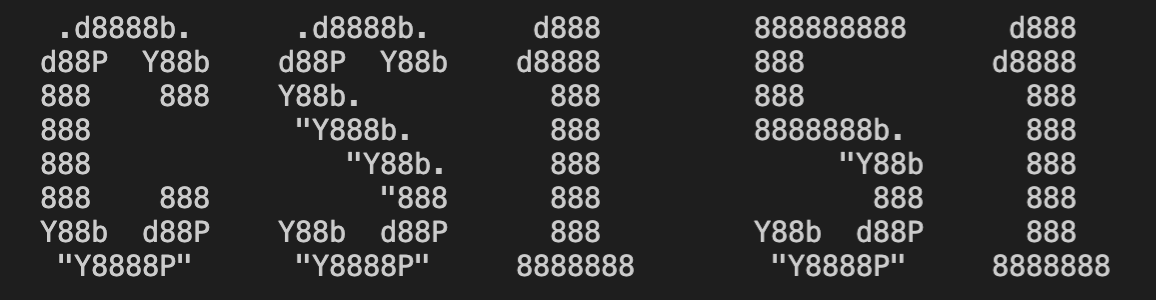
For example, your program will take an input string, such as 'CS151', and produce one multi-line string, which when printed, looks like:
Summary of ASCII art terminology
An ASCII art symbol is a multiline string that makes up an stylistic representation of one alphanumeric or punctuation character. Each line is a fixed number of string characters long (e.g. 15). The last character on each line is a new line character ('\n'). The total number of lines ("rows") making up the ASCII art symbol is also fixed (e.g. 11). For example, this multiline string makes up the ASCII art symbol for capital "A":
       d8888
      d88888
     d88P888
    d88P 888
   d88P  888
  d88P   888
 d8888888888
d88P     888
Above, despite there being different numbers of visible characters on each line of the "A", each line is always 15 characters long when we count spaces and the new line escape sequence character (\n) at the very right. For example, the first line making up the "A" is more whitespace than non-whitespace, but is still 15 characters long because of whitespace.
The "empty, blank lines" at the bottom are still part of the symbol. While they are not needed for the "A" symbol, other alphanumeric symbols (e.g. "J") make use of the additional lines.
The ASCII ART font alphabet is the collection of all letters, numbers, and punctuation that we are capable of expressing with an ASCII art symbol. In the project, the font alphabet is: ABCDEFGHIJKLMNOPQRSTUVWXYZabcdefghijklmnopqrstuvwxyz0123456789?!
With this font alphabet, we could convert "A" into ASCII art, but not "." (its symbol is missing from the font alphabet).
2a. Download the ASCII art font
Make a new file called ascii_art_text.py.
We will be using an ASCII art font called colossal. You will need to download two text files to get started:
| Font alphabet | Font symbols |
|---|---|
| colossalFontAlphabet.txt | colossalFontSymbols.txt |
2b. End product
Your program will take in an input string from a command line argument, print out its ASCII art representation, and save the ASCII art to a text file.
For example:
python3 ascii_art_text.py CS151
should print out in the Terminal an ASCII art representation of 'CS151' in the colossal font:
2c. Designing your program
You are free to structure ascii_art_text.py however you wish, but you should use the principles of top-down design to guide you (you should describe how you did this in your report).
You will be graded on code style, readability, and design best practices like usual (e.g. minimal top-level code, command-line argument usage statements, helpful variable/function names, docstrings, etc.)
To help get you started, here is "pseudocode" describing the high-level goals of the program:
- Check command-line arguments, get the input string passed in.
- Read in the ASCII font alphabet from file (i.e.
ABCDEFGHIJKLMNOPQRSTUVWXYZabcdefghijklmnopqrstuvwxyz0123456789?!). - Read in the ASCII symbols for the ASCII font from file. Store them in a dictionary.
- Keys: single characters in the ASCII font alphabet — e.g.
'A','B', ...,'!' - Values: A list with 11 items: One string for each of the 11 lines making up each ASCII symbol (see A example above). Each string should not have a new line character at the end.
- Keys: single characters in the ASCII font alphabet — e.g.
- Build a string that represents the input string expressed as ASCII art (review class notes and hints below).
- Print the ASCII art string.
- Write the ASCII art string to a text file.
Include an image of an example ASCII art output in your report. This is required image 3.
2d. Test cases
I suggest testing your code as you go. Here things you should check for:
Font alphabet
Should contain 64 characters: A thru Z, a thru z, 0 thru 9, and ?!
Test ASCII Symbols
Assuming your dictionary is called asciiSymbolDict:
- The number of keys is 64 (
len(asciiSymbolDict.keys())). - The number of items (strings) in each list (dictionary value) is always 11 (
len(asciiSymbolDict['A']),len(asciiSymbolDict['B']), etc.). This corresponds to the number lines that compose each ASCII art symbol. - The length of each string is always 14 (
len(asciiSymbolDict['A'][0]),len(asciiSymbolDict['A'][1]), etc.). This is the number of characters (all characters including whitespace and non-whitespace) making up each of the 11 lines of an ASCII art symbol. - You should see a single ASCII art symbol when you join its list by new line characters. For example,
print('\n'.join(asciiSymbolDict['A']))should reproduce the ASCII art symbol above for "A".
Hint: If the length of each string is 15, you may not have removed new line characters.
Test ASCII art string
Assuming the test input string Colby123, the length of the final ASCII art string should be 1242 (len(art_string)). Getting 1243 would be fine too.
The ASCII art string should occupy 11 lines (len(art_string.split('\n'))) when printed or written to a text file.
2e. Hints
General: Roughly each of the above numbered steps should happen in a separate function. The functions should be called in roughly that order from a main function. Pass in only relevant data needed for each subtask as parameters, return the result(s) back to your main function.
Step 3: It would probably be easiest to use the (nested) for loop approach used in lab for reading from the file. Remember to strip out the new line characters as you read in each line!
Step 4: We want to concatenate the 1st lines of the ASCII art symbols representing all the characters in the input string, then add a new line character, concatenate together the 2nd lines of the ASCII art symbols representing all the characters in the input string, and so on. The dictionary should help you assemble each line of the final ASCII art string for the appropriate characters in the input string.
Check reproducibility
In order to grade your project, we need to be able to run your code and get the same results as you do! In your project submission ZIP file, please include any PPM images that are needed run your code (including exotic.ppm).
Here is a summary of the expected outputs from each of the source code files that you created:
python3 ascii_art_image.py: Makes an ASCII art version ofexotic.ppm— either one of your 2 or 3+ character "filters".python3 ascii_art_text.py <a word>: Should print the word passed in as a command-line argument in ASCII art form.
If you use command-line arguments, please explain what they are and provide an example way to run your code in either code comments or your report.
Extensions
Congratulations on completing the core tasks! If your code and report meet the above expectations, you’ve already earned up to 26/30 points for this project.
The remaining 4/30 are a chance for you to earn credit for exploring parts of this project and digging deeper to express your creativity! This is entirely optional; 26/30 is a B and is a perfectly respectable place to stop. Extensions are open-ended and exist to compliment the structured core project. Explore and learn something new that interests you! Concentrating your energy on 1-2 "deep" extensions that challenge you will earn you more points than many small, "shallow" extensions.
You can pick your own topics that interest you. Here are a few examples:
- Make ASCII art out of images with different rules than in the core project that create creative, interesting patterns.
- Find decently large set of text (e.g. a book chapter) stored as a text file online. Research string methods then write a program to analyze its properties (e.g. number of unique words, number of sentences, number of paragraphs, etc.).
- Create a version of your image-to-ASCII filters that builds the string via lists and
joinrather than string concatenation. Figure out how to time the runtime of a function in Python (i.e. number of seconds it takes to finish). Analyze differences in speed between the two approaches. - Make ASCII art images out of emoji.
- Create ASCII art using different fonts that you find online (cite source) or make yourself.
- Handle making ASCII art out of text with spaces or multiple lines.
- Make ASCII art that flows vertically rather than horizontally (ASCII art written sideways).
Submission checklist
To turn in your project, make sure you do all of the following:
- Check the rubric in Google Classroom and make sure your report and code contain all the required parts.
- Connect to Filer and navigate to
/Courses/CS151_A_FA/<your username>/Private/Projects/<your username>_P07. - Make sure your lab code is inside
/Courses/CS151_A_FA/<your username>/Private/Projects/<your username>_P07/Lab_07. - Copy your latest project code inside
/Courses/CS151_A_FA/<your username>/Private/Projects/<your username>_P07. - Create a zip file of your folder
<your username>_P07. - Attach (drag) the zip file to the posted project assignment on Google Classroom.
- Click Turn In on your Google Doc report on Google Classroom.