 Spring 2018
 Word Trends
The main purpose of this project is analyze trends in 8 years of Reddit posts. The first analysis will be to find the most common words in each year. Using a heap data structure to store the word count information is an efficient way to implement the task. The second analysis will be to look at the trends of specific words of your choice over the time period of the data.
Tasks
- FindCommonWords: create a
FindCommonWords class that allows you to read in a word count
file and report the the most common words. There are two
ways to design this class.
- You could use a WordCounter to
read the word count file
and store the word-value pairs so that you can
look them up by key. Then use your
PriorityQueue
PQHeap<KeyValuePair<String,Integer>>to store the pairs and retrieve them in order from highest count to lowest count (i.e. the Comparator will need to operate on KeyValuePairs, but use the Value to do the comparison). - Write code in FindCommonWords that reads in a word count file and puts the key-value pairs directly into a PQHeap.
Test your class using counts_short.txt. Debug it until it works properly.
Run your code on the Reddit comments for 2008, 2012, and 2015 and report the 10 most frequent words for each year. Do the most frequent words change much?
- You could use a WordCounter to
read the word count file
and store the word-value pairs so that you can
look them up by key. Then use your
PriorityQueue
- FindTrends: create a
FindTrends class that allows you to determine the
frequency of a specific set of words in a set of
words. For example, you could use command line arguments
to specify the names of multiple word count files and
then a set of words to extract from those files.
Report the frequency for each selected word in each file. Note that it is important to report the frequency, rather than the count, because each file has a different number of words.
For example, you could design your main program to require inputs formatted according to this usage statement:
USAGE java FindTrends <WordCountBaseFilename> <WordCountNumberBegin> <WordCountNumberEnd> <interestingWord1> <interestingWord2> ...
 where <WordCountBaseFilename> contains the text part of the name of
 each WordCount file you want to analyze.
 and <WordCountNumberBegin> refers to the first number
 and <WordCountNumberEnd> refers to the last number  in the range of word files you want to analyze.
 <interestingWord1> <interestingWord2> ... is the list of words you want to analyze.
To generate the graph shown as follow
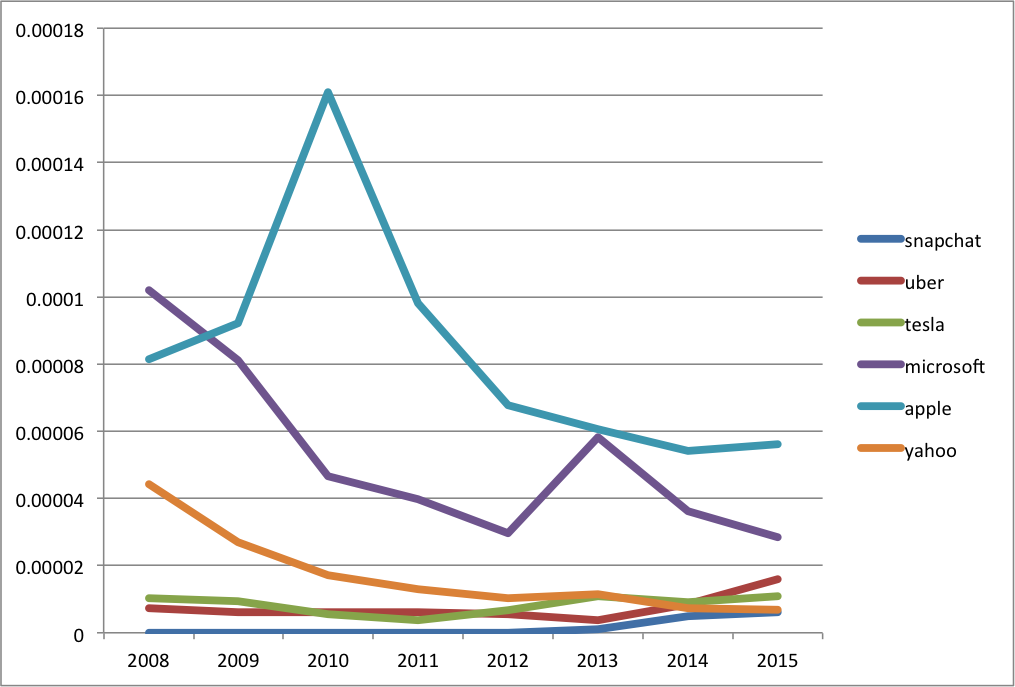
Using this command line ordering, the following command should produce something like the output below.
			java -Xmx512m  FindTrends ../proj07/counts_reddit_comments_ 2008 2015
			snapchat uber tesla microsoft apple yahoo
You can copy-paste the output to a spreadsheet, add years as column headers, and plot the results as lines. Sometimes you may need to press the "Switch Plot" button to switch the rows and columns.
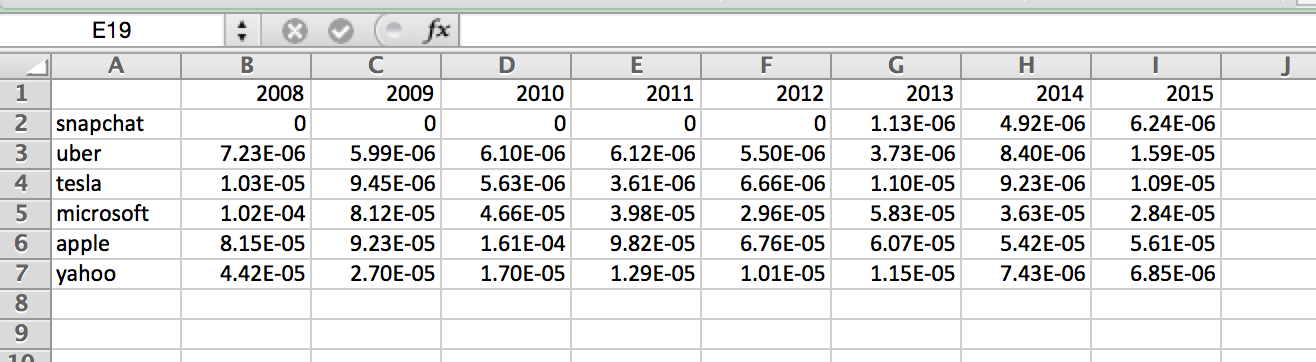
If you want to save yourself time, output the data as a comma-separated value [CSV] file, including the headers, which can be read directly by a spreadsheet program.
Call FindTrends with a list of approximately 6-10 words. Choose a theme for the words that you think may trend over 8 years, keeping in mind that the comments are all collected during the month of May. It is a good idea to use words that are not particularly common, such as proper names. Here are some example lists you could use:
- sony portal ipad syntax facebook friend,
- phelps usain raisman arod peyton,
- clinton sanders rubio trump obama romney cruz palin.
You are encouraged to develop your own list.
- Generate a line graph with your results and include it in your report. Your report should also include an analysis of the output. Are these trends expected? unexpected? What events at the time could explain the trends? Think about these questions when you make your lists.
Extensions
- Use more than one list of interesting words and report the trends, including an analysis of the trends and what might explain them.
- An alternative method of identifying the top N words is to read them into an ArrayList and sort them. Do a time comparison of this method with using the heap.
- You can build a node-based or an array-based heap. Whichever one you choose, implement the other and do a time comparison. Which one is faster? Which one is more memory efficient?
- For any assignment, a good extension will be to implement a Java class that you have't implemented in the past projects and demonstrate that it has the same functionality as the Java class.
Report
Your report should have a simple format.
- A brief description of the overall project, in your own words. Identify both the data structure used and the task solved by using it. Finish by indicating whether your analysis worked as expected and what you discovered.
- An explanation of your solution, focusing on the interesting bits. In this assignment, for example, the interesting parts are the heap implementation and extracting the words of interest from the word count files.
- Printouts, pictures, or results to show what you did. For this assignment, you should include a table of the high frequency words and a plot of the word trends for your interesting word list.
- Other results to demonstrate extensions you undertook.
- A brief conclusion and description of what you learned.
- A list of people you worked with, including TAs, and instructors. Include in that list anyone whose code you may have seen, such as those of friends who have taken the course in a previous semester.
Handin
Make your report for the project a wiki page in your personal space. If you have questions about making a wiki page, stop by my office or ask in lab.
Once you have written up your assignment, give the page the label:
cs231s18project8
You can give any wiki page a label using the label field at the bottom of the page. The label is different from the title.
Do not put code in your report or anywhere it can be publicly accessed. To hand in code, put it in your folder on the Courses fileserver. Create a directory for each project inside the private folder inside your username folder.