CS 333 Programming Languages
Project 5
Due: Wednesday, April 23, 2025 11:59 pm
Part I: File I/O and Memory Management in C
Tasks
-
For this task, you will create examples of signal handling in C. This task should be part of the C semantics project. But the semantics project is very long already. So, this error-handling part has been moved to this project.
First, read the man pages on the signal package. In the terminal, you can use man to get the signal man pages.
man 3 signal
Write a program that can respond to a
ctrl-C(interrupt). Your main function should use the signal function to set up a handler for the SIGINT signal and then enter an infinite loop. Your handler function just needs to print out a message (e.g. "Interrupted!") and then call exit();Include a screenshot of your output to your repot.
Write a program that can handle a floating point exception. Your main function should use the signal function to set up a handler for the SIGFPE signal then do something inappropriate with floating point values, such as dividing by zero. See if you can continue the program's execution after the exception takes place.
Include a screenshot of your output to your repot.
Write a program that can handle a segmentation fault error. Your main function should set up a handler for the SIGSEGV signal then execute code that results in a segmentation fault (access illegal memory). Your handler should print something appropriate and exit.
Include a screenshot of your output to your repot.
-
The purpose of this task is to let you have some experience on File I/O in the C language. You are expected to implement a word counter that is able to count the number of occurrences of every word in a text file. The basic requirements are as follows.
- The word counter should be case-insensitive. For example, there are two occurrences of the word, "the", in the sentence, "The events in question occurred in the early days of my association with Holmes.".
- The word counter should be able to ignore the punctuation. For instance, "Holmes." and "Holmes," should be counted as "Holmes".
- The word counter should read the filename from the command line.
- The word counter should print out the top 20 words in terms of the word frequency in descending order.
- You must use your linked list implemented in task3 of Project 4 to implement the word counter.
- Use this file to test your word counter.
Your output should look like
    the	17
     of	7
    and	6
    was	5
     in	4
   with	4
      a	3
windows	3
 broken	2
  wings	2
central	2
portion	2
    had	2
   been	2
    but	2
     up	2
   were	2
  these	1
blocked	1
 wooden	1
It's okay if words with the same frequency are displayed in a different order.
In your report, include a screenshot of your output and illustrate how you implement the above requirements a, b, c, and d.
-
This task is to try and estimate the time cost of memory management in C.
What is the average time per call to allocate a certain amount of memory?
Try timing several hundred/thousand calls to make the estimate, and try the experiment with at least three different memory sizes (small, e.g. 100 ints, medium e.g. 10K ints, large e.g. 1 million ints). Note that the first time malloc is called, there are start-up costs, and it takes extra time. Do not include the first call to malloc in your timing.
You are expected to observe the time it takes to allocate a e range of amounts of memory. What are the trends relating the allocation time to the size of thh allocation? Is it more efficient to allocate all the bytes at once, or in smaller chunks? Answer these questions in your report, using at least one graph with your data to back up your explanation.
There are many ways to time code. You can pick the way that works for you best. One is to use the ftime library call, which returns a time stamp you can use to estimate total run time reasonably well. Don't try to use it to time small things. But it works ok to use for stuff that takes at least a quarter-second.
The second way to time code is to use a profiler. On a Mac, you can use Activity Monitor, which you can find in the Instrument. On a linux machine, you can use a tool called gprof. You can use gprof on any of the dwarves (linux machines) in the robotics lab.
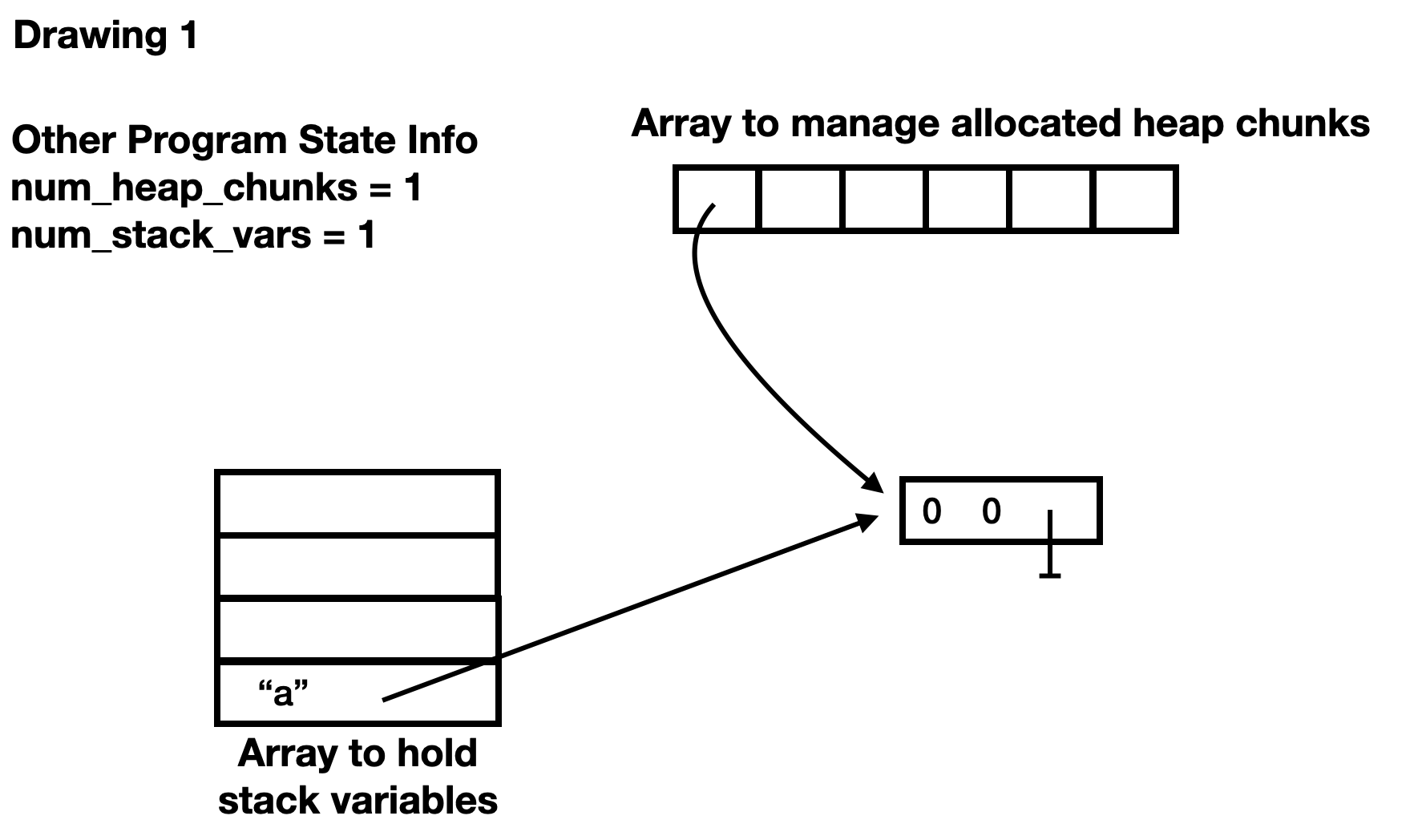
Write C code to familiarize yourself with the process of a Mark and Sweep Garbage Collector. In an effort to keep this as short, but informative, as possible, we are going to represent the stack and heap with structs, and write main code that manipulates the stack and heap as if there were calls to malloc and assign. Your job will be to implement a Mark and Sweep algorithm. But first, we need to describe the setup.
- The simulated stack will store Vars. A Var stores a name (char *) and a reference to the heap, which could be NULL, if we are simulating a variable that isn't a pointer.
- The simulated heap will allocate HeapChunks. A HeapChunk stores a list of pointers to other chunks (which could be NULL) along with the number of references to other chunks.
- The Program State stores an array of Var structs (the stack), the number of items on the stack, an array of allocated HeapChunks, and the number of allocated HeapChunks.
- When a HeapChunk is allocated, a reference to it is stored in the allocated heap array in the Program State.
- We can assign a HeapChunk reference to a variable on the Stack by callined an updateStack function.
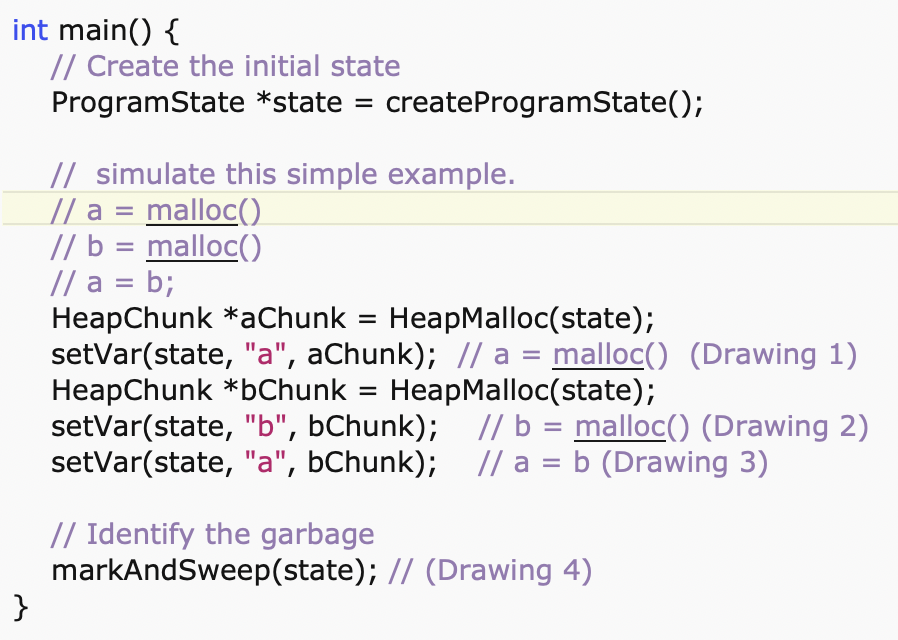
For example, consider the main code
At Drawing 1, we draw the stack with the first entry containing the name of the variable and the reference to a HeapChunk. The heap has just one HeapChunk. The array to manage allocated HeapChunks points to the one HeapChunk. Its entry starts with 0 (it is unmarked), then has a second 0 (there are no other HeapChunks referenced), and ends with a null pointer (there are no other HeapChunks referenced by this one).
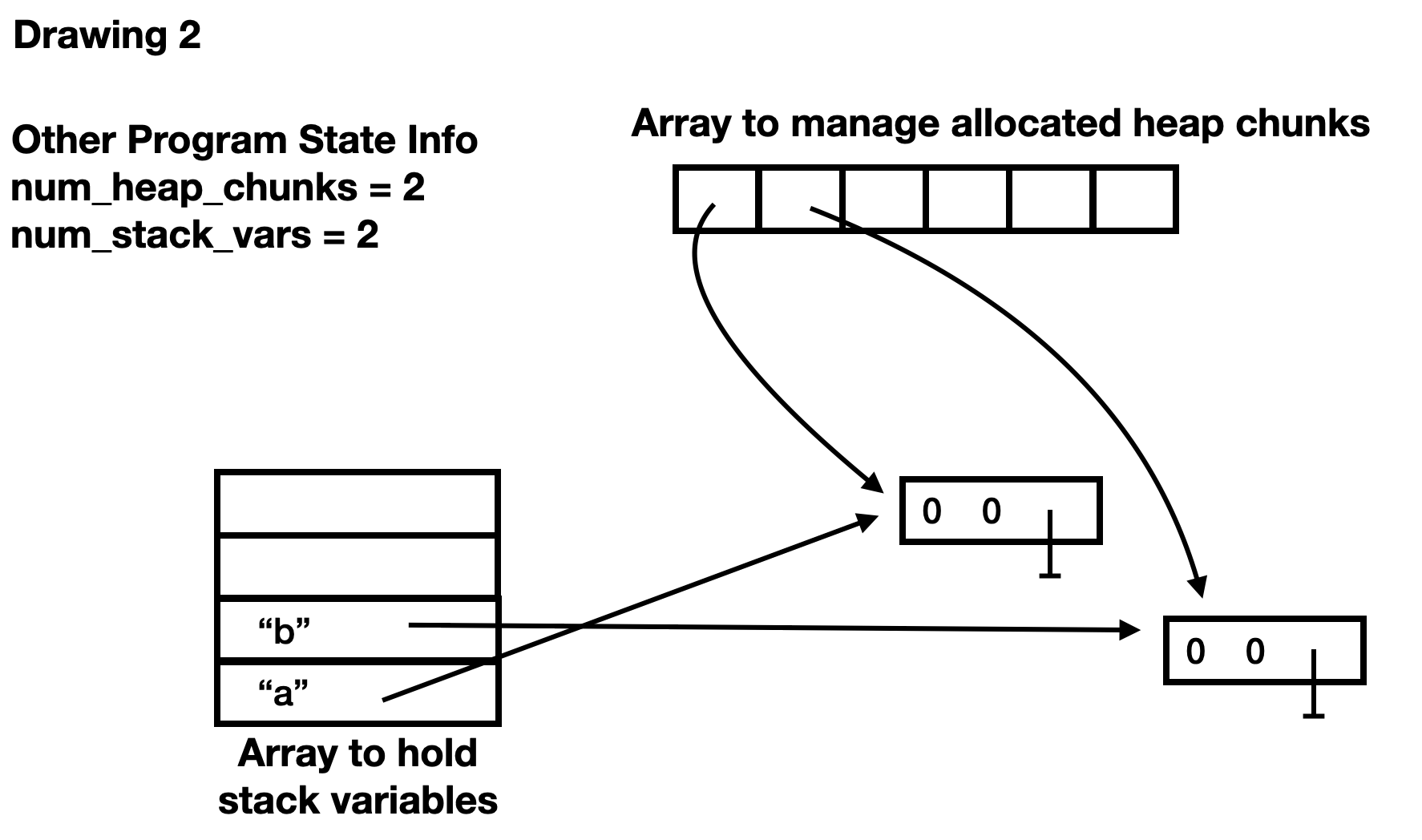
At Drawing 2, we have a second Var on the Stack and a second HeapChunk on the heap.
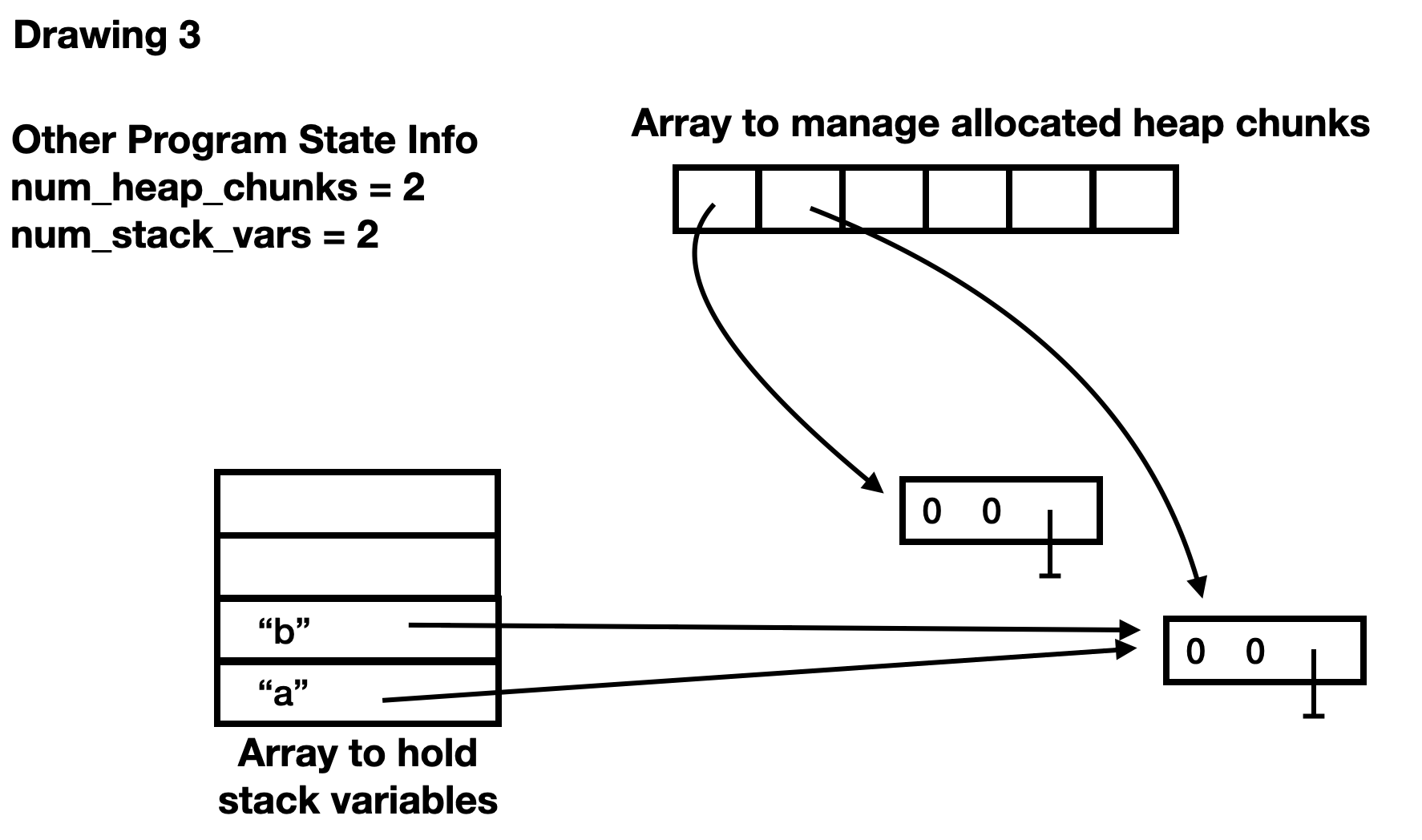
At Drawing 3, we have changed the value of the reference associated with "a"
After the mark phase, we have one HeapChunk marked (the first zero is now a 1). The HeapChunk with a zero for the marked value is garbage and should be cleaned up.
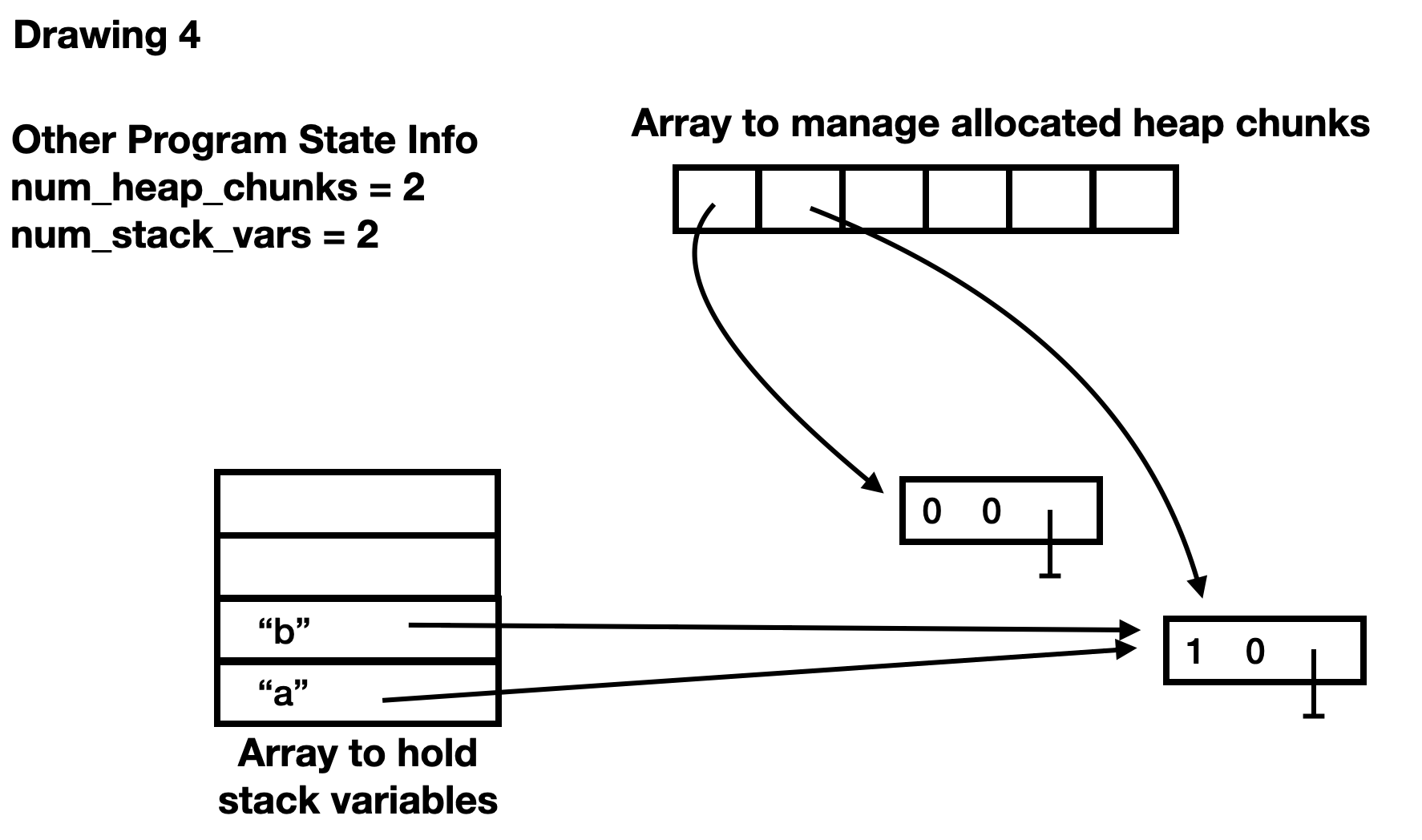
In a more complicated example, we have code that adds references to HeapChunks, creating a circular links. Consider the main code
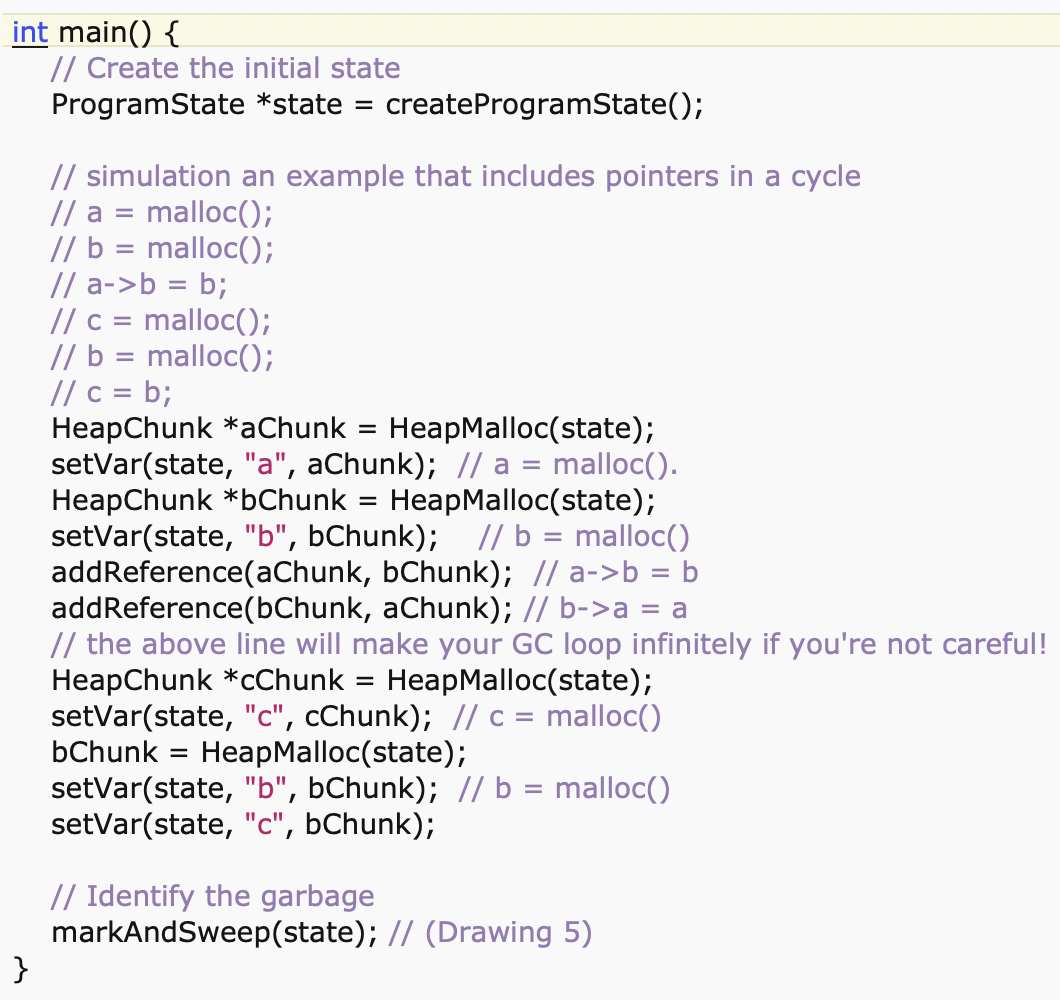
Drawing 5 shows the memory after all the code has been run.
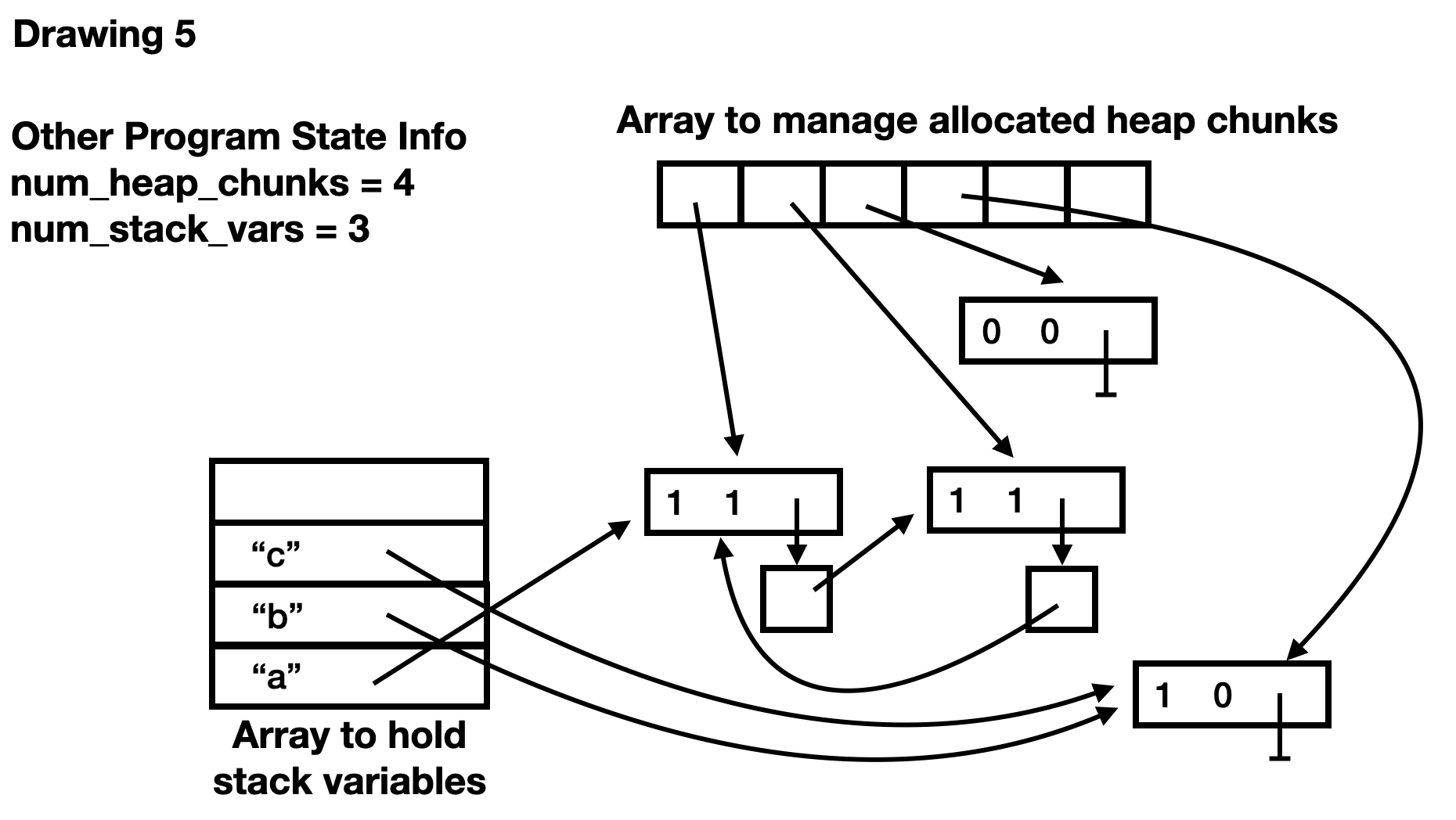
Your next job is to add code to construct a test example of your own, run the code, and draw an image for it, similar to the final image above. The code should simulate at least 3 stack variables, at least 4 allocations on the heap, and should have a reference cycle that can't be reached from the stack (i.e. it should be a good example of why reference counting isn't enough). Add a description of your example (a commented code snippet) and your drawing to your report.
Part II: File I/O and Memory Management in Selected Languages
Tasks
This part is to do some research on memory management in your selected language.
- Show how the language supports error handling on Google Sites. Are there built-in programming structures like try-catch blocks? Give examples that handle several different types of exceptions. You may want to integrate some of this discussion with the file I/O examples. If your language has no specific error handling support, explain if there are any conventions for handling and communicating errors.
- Do your best to research what memory management algorithms
your languages use. Show your work on the Google Sites.
- If your language has explicit allocation/deallocation, then create some code examples.
- If your language requires allocation, but not deallocation, then create some code examples. Show some side-by-side comparisons of the differences between C and your language.
- If your language pretty much hides memory allocation, show a variety of statements that create memory, and a variety of conditions whereby that memory gets lost (or put back into a free memory pool).
-
Repeat the word-frequency task from part 1 in your selected language. Make use of built-in data types (like a dictionary), if possible, to make the task easier. Include a screenshot of your testing result for the word counter in your report.
-
On Google Sites, show how the selected language is able to read from and write to a file. If possible, you can use the above word counter in the selected language as an example. Otherwise, please give a short sample code to demonstrate.
- How do you open, close, and read from a (text) file? Is there support for binary files?
- Does your language have built-in support for I/O, or is it part of a set of standard libraries?
- Does your language support opening web locations (URLs) as well as files on the local disk?
- Can the user input information into the program interactively?
- Undertake an experiment in a language with automatic memory management (or Java, if your language doesn't fit the model), and see if you can identify when a garbage collection sweep takes place. Create and delete lots of memory inside a function and time the function as you call it many times. Look for times when the function call takes significantly more time than average. See if you can write a program that automatically detects garbage collections from the timing information.
Extensions
- Describe memory management for a second selected language.
- For the memory management example, try writing a functionally equivalent example in C, explicitly handling the kinds of information required for the memory management system of your chosen language.
- Look up the code for malloc and free in glibc and explain how they work in your Google Sites report.
- Write a compilable haiku on memory management. Another option for this haiku extension is to write a compilable haiku on functions or file I/O in the selectedlanguages.
- Make your word counter more robust so that it is able to handle invalid command-line inputs and invalid files.
- Implement additional data structures, such as a binary tree or hash map to support the word frequency task.
- Use a profiler to test your code.
- Use valgrind to test your C data structures from prior projects and show that they do not leak memory (fix them if they do).
- Explore how to do reference counting properly when writing C code to interface with Python. If you want to try writing code, use the ctypes package in Python to connect to C functions.
Please note that it is your responsibility to explicitly indicate the extensions you have taken. If you take the extension in C, please indicate explicitly in the codes and README file. If you take the extensions in the selected languages, please indicate explicitly in your Google Sites report or source codes and README.
Submission
The submission of this project has two components:
- Create a folder named Project5_<username> Place the required files into it, zip it, and upload it
to the Google Classroom.
Required Files::
- Code: Create a fold for each language, including C and your selected language(s). Place all of your C code and selected language programs to corresponding folders. It should be clear which files correspond to which tasks. All these language folders should be placed into the Project5_<username> folder. Note that the quality of your comments counts toward your grade.
- README: We use markdown files for README files. Markdown files are files with the
.mdfilename extension. Each project should have a README file along with all your source codes. The README file will contain:- Project identifier, your name, and the submission date.
- The URL of your Google Sites report.
- The directory layout for your hand-in folder. You can use the Unix
treecommand to generate this. - Your operating system and C compiler (e.g. use gcc --version).
- For each task, include how to compile your program, how to run your program, known bugs if there is any, and the program output (a screenshot). The screenshot should include the actual output of running the program if the output is no more than 100 lines. Otherwise, give a brief version of the output.
- Text and images reporting on the C part of the project.
- A description of each extension you undertook (for the C part of the project).
You can follow the instructions for the README file from Project 1.
- Google Sites Report: The report of this project should have the following elements.
- Title of the project and your name
- A section for each task of part II. Every section should contain the snapshot of your sample programs, the outputs, and your explanations.
- If you complete extensions in your selected language, please include a section for each extension, providing sample programs, outputs, and explanations.
To check whether you've made your report well organized, please follow the Organization part in the Google Sites section in this writing page. Remember to publish all your changes and include the homepage link of your CS333 Google Sites in the README file.
© 2025 Ying Li. Page last modified: .