CS 151 Fall 2026 Syllabus Labs/Projects
Project 5: Meme Generator
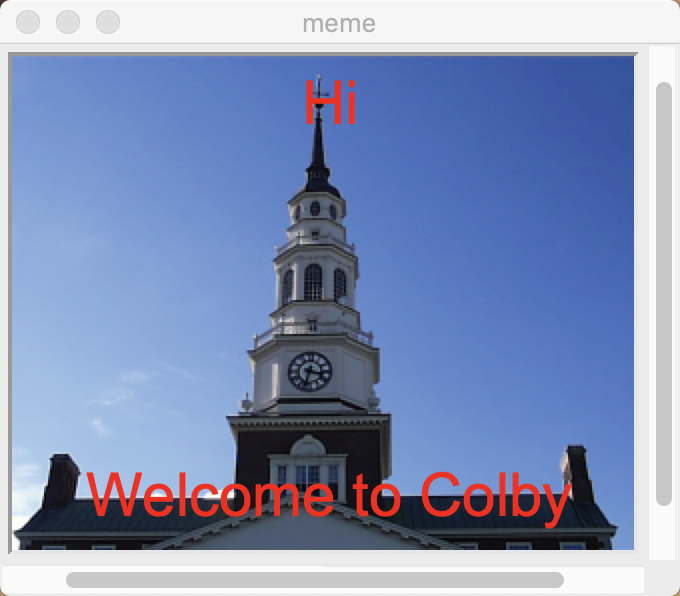
In this project, you will arrange images and text to create memes. You will use lists to organize which images and text goes where in your grid.
Tasks
- Project 5: Meme Generator
1. Create a Single Panel Meme Generator
Make a copy of show.py and rename it meme.py.
1a. Create a Single Panel Meme
Start with your main function from the lab, you should have an image centered in the window. The window should be the size of the image.
In your main function of meme.py create two text objects, one centered at the bottom of the image and one centered at the top of the image. Choose a font size and color that is visible.
Draw the text objects after the image is drawn.
Run your code to make sure it produces the correct result.
1b. Use Command Line Arguments to Control the Image and Text
Allow the user to pass in two optional command-line arguments to meme.py. The first string will be the text for below the image, and the second string will be the text for above the image. Be sure to pass the command line arguments as function parameters to your main function and change your Text object constructors to use those parameters. Give empty strings as the optional function argument for your two new parameters.
Here is an example of showing the image miller.ppm with the top text top text "Hi" and the bottom text "Welcome to Colby". (Like the image at the top of this project).
python3 meme.py miller.ppm "Welcome to Colby" "Hi"
Imagine giving meme.py or show.py to a friend and they tried to run your code. The program would crash with a unhelpful error message because they don't know that they need to pass in the image filename as a command-line argument (try it!). Frustrating!
From now on, you will be expected to print a proper usage statement if your program uses command-line arguments (so that the user knows how to run your program!).
In both meme.py and show.py, check the number of command-line arguments that the user passes in. If the user does not pass in enough command-line arguments, print out how to run your code without crashing. Here is a good example:
Usage: python3 show.py <filename of image>
Call the exit function right after printing out the message to stop the program cleanly without crashing.
Test running meme.py and show.py with the correct and incorrect number of command-line arguments. For example, running show.py:
- with no command line arguments should print out your message and exit "cleanly" without crashing.
- with one command-line argument (the filename) should work like before.
1c. Create 2 memes with different command line arguments
In your project folder, create a new folder called images. Put two png or ppm images in the images folder that you would like to use for your memes. To access your images you will now use the path "images/filename.ppm" in your code.
Take a screenshot of the meme that you created with 2 command line arguments this is Required Image 1 in your project. In your report include the command line arguments you used to produce the meme.
Take a screenshot of the meme that you created with 3 command line arguments this is Required Image 2 in your project. In your report include the command line arguments you used to produce the meme.
Check your code!
In order to grade your project, we need to be able to run your code and get the same results as you do!
In your project submission ZIP file, please include any PPM images that are needed run your code.
Here is a summary of the expected outputs from each of the source code files that you created:
- Prints a usage statement and does not crash.
python3 meme.py
- In a new window display the image passed in by command-line arguments. (see note about command-line arguments below).
python3 meme.py <image filename>
- In a new window display the image passed in by command-line arguments, with the bottom of the image.
python3 meme.py <image filename> <bottom text>
- In a new window display the image passed in by command-line arguments, with the top text at the top of the image, and the bottom text at the bottom of the image.
python3 meme.py <image filename> <bottom text> <top text>
If you use command-line arguments in any file, please explain what they are and provide an example way to run your code in either code comments or your report.
AI Usage Statement
Document your AI usage in the format described here under "AI Usage Statement" OR if you didn't use AI answer the following question. The question should be answered in a short paragraph (100-250 words total) without using AI and take approximately 10-20 minutes to complete, including researching and writing.
Alternative Assignment: Find a specific example of Voice Assistants and a company that provides the service. Research and explain an underlying component of the technology, computational method or machine learning model used, be as specific as possible. Describe a potential issue with using voice assistants, and how your specific example does or does not address it. Include at least one cited credible source (academic paper, official tech documentation, or reputable technical news outlet).
Extensions
Congratulations on completing the core tasks! Between the code that you’ve already written and the report that you write, you’ve already earned up to 26/30 points for this project. If you turn it in by the first deadline that's 27/30 points.
The remaining 3/30 are a chance for you to earn credit for exploring parts of this project and digging deeper to express your creativity! This is entirely optional; 27/30 is an A- and is a perfectly respectable place to stop. Extensions are open-ended and exist to compliment the structured core project. Explore and learn something new that interests you! Concentrating your energy on 2 "deep" extensions that challenge you will earn you more points than many small, "shallow" extensions.
You can pick your own topics that interest you. Here are a few examples:
- Control other aspects of your memes using command-line arguments. (.5pts each)
- Create a multipanel meme. (1-1.5pts)
- Explore other objects from the graphics library and add shapes to your memes. (.5pts each)
- Explore other objects from the graphics library and create an additional complex scene. (1-1.5pts)
- Figure out how to have objects in the graphics window change when you click on a portion of the window. (1-1.5pts)
To get credit for your extensions, you must document them in your report. For each extension this includes:
- A description of your extension and how it fulfills one of the above tasks.
- A screen shot (or multiple) of your extension.
- An explanation of how you implemented your extension.
Submission checklist
To turn in your project, make sure you do all of the following:
- Check the rubric in Google Classroom and make sure your report and code contain all the required parts.
- Rename your project folder to include your Colby username. For example, I would name mine
hewolfe_Project5.zip. - Create a zip file of your project.
- Attach (drag) the zip file to the posted project assignment on Google Classroom.
- Click "Turn In" on the Project 5 assignment in Google Classroom.