Project 05 |
Goals
- Design and implement an accelerometer/compass controlled mouse.
- Control the x and y position and the mouse.
- Complete simple tasks with the mouse.
|
Setup |
Setup
Start with your code from Lab 5.
Save it as a new Arduino project titled colbyUsername_P05 (with your colby username, mine would be hewolfe_P05).
Bluetooth Firmware update
Using a bluetooth enabled smart phone, (iOS or Android) update the firmware of the Bluetooth module. [instructions] If your phone will not connect, let me know and I can help.
|
Accelerometer Mouse |
Accelerometer/Compass Mouse Design
Design an accelerometer based interface for a mouse.
Interface requirements:
- Control X,Y position of the mouse
- Start left click
- Stop left click
You may choose to filter or smooth your data using methods from the previous projects.
Carry-over from Lab
Setup Changes
Loop Function
- Use
AT+BleHidMouseMove= to control the x and y movement of the mouse. [Documentation]
- Use
AT+BleHidMouseButton= to control the left button. [Documentation]
- Use Linear Interpolation to smoothly transition from your accelerometer readings to screen movement.
Linear Interpolation
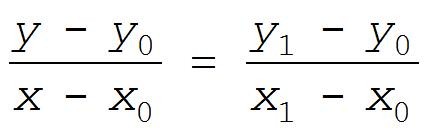
Write a method that will take a value from one range and map it to a new value inside another range. The idea here is that we want to map the input value, x, which is within the range x0 to x1, to a new range y0 to y1.
y the new value (output)y0 the new minimum value y1 the new maximum value x the input value x0 the original minimum value x1 the original maximum value
Documentation and Analysis
- User Interface Documentation
- Using a diagram, explain how your interface works.
- In a short paragraph explain how your interface works and why you made the design decisions that you did.
- Testing (on video)
- Open an application by moving the mouse over to it and clicking on it.
- Drag and drop a file from one folder to another.
- Analysis
- How easy is it to use the interface?
- How accurate is it?
- Were there any modifications you made to it increase the accuracy/usability?
|
Extension |
Minor Extensions
Minor extensions build on the pre-existing circuit for this project.
Here are a few examples:
- Add additional functionality/controls.
- Implement, test and compare other types of interpolation (SLERP etc).
- Connect to a device that is not a phone or computer and create an interface for it. Include atleast 3 commands and explain your user interface design.
Document your minor extension:
- Submit your code on filer in a folder inside your project folder.
- A 1-3 minute video documenting your extension working. (If different from project)
- A description of the extension.
- A section on implementation.
- A section on results & reflection.
- Include any relevant charts or graphs.
Major Extension
Design and implement an idea for a new project which involves adding new components and modifying the circuitry.
- It must incorporate the materials from this project; the bluetooth and accelerometer breakout boards.
- It must include atleast one of the following components: microphone, a piezo element, the IR emitters, IR receivers, and/or the vibrating motors.
- It can include potentiometers, buttons and/or red LEDs.
Document your major extension:
- Submit your code on filer in a folder inside your project folder.
- A 1-3 minute video of the system working.
- A description of the extension.
- A circuit diagram.
- A photograph of the circuit board.
- A section on implementation.
- A section on results & reflection.
|
Submission |
Submit your code on Filer
Submit your arduino code in a folder titled colbyUsername_P05 (with your colby username, mine would be hewolfe_P05).
Submit your report and video on Google Classroom
Upload a 1-3 min Documentation Video of your accelerometer mouse working. Show the ability to open an application by moving the mouse over to it and clicking on it. Show the ability to drag and drop a file from one folder to another. State your intention before completing the task. Explain your interface as you are using it.
Attach a Google Doc Report which includes:
- Photo of circuit. Clear photo of the circuit in which the wiring is clearly visible.
- Implementation Section
- Explain how you implemented the project.
- Explain what algorithms or techniques you used.
- Draw a diagram and explain how you designed your interface.
- Results & Reflection Section
- How well does your implementation work?
- What were the results of your analysis?
- Acknowledgements Section
- What resources did you use? Include websites, books and anyone you received help from or discussed the project with.
|