Project 02 |
Goal
- Create a vibrotactile watch using the motor, button and potentiometer circuit (from Lab 2).
- Implement Signal Generation techniques.
|
Setup |
Setup
Start with your code from Lab 2 that controls a motor.
Save it as a new Arduino project titled colbyUsername_P02_Part1 (with your colby username, mine would be hewolfe_P02_Part1).
|
Signal Generation |
Square wave Generation
Wavetable Generation
Read about PWM (Pulse Width Modulation).
- Create a file
Waveforms.h and put it in the same folder as your arduino project.
- Add a header guard to the top of
Waveforms.h
- Create a constant by defining
maxSamplesNum as 120.
- Create a static integer array
waveformsTable with maxSamplesNum values and set it to the list of square wave values.
Using Wavetables
Read: 6.3.3.1 Table-Lookup Oscillators and Wavetable Synthesis
- In your .ino file include
Waveforms.h
- Globally define
oneHzSample as 1 million divided by maxSamplesNum
- Within the loop function, write a value from the
waveformsTable to the motor's pin. Then delay oneHzSample microseconds. Arduino Reference
- Use a global variable to track what index of the waveformsTable is being read and increase the index in each loop.
- Test your code with your board.
|
Vibrotactile Generator |
Generate more Waveforms
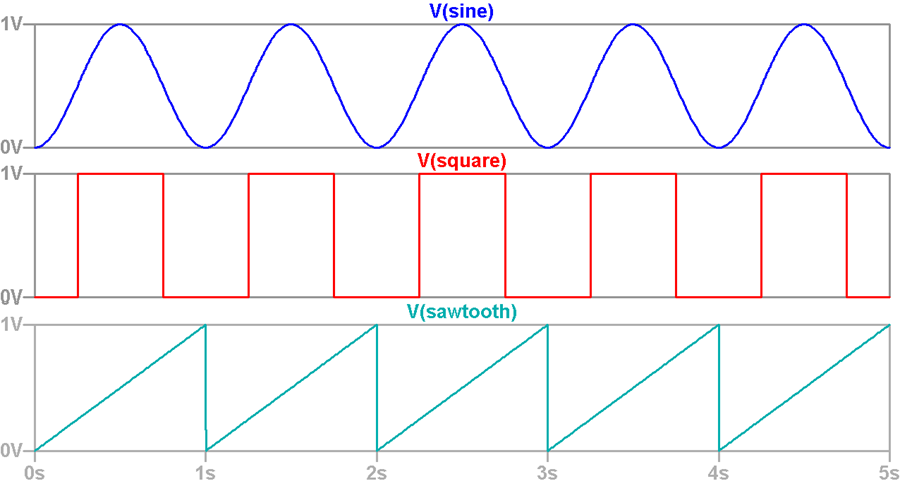
- In your .h file create a constant by defining
maxWaveform as 3.
- Modify
waveformsTable to be a maxWaveform X maxSamplesNum 2D array.
- Generate and add an array of 120 hex values to represent the Sawtooth wave from 0 to 255 shown above. Modify generator_example.cpp, using round.
- Generate and add an array of 120 hex values to represent the Sine wave shown above. Modify generator_example.cpp, using sine.
- Modify your code in your .ino file to change the waveform when the button is pressed, cycling through the three vibrotactile patterns.
Control the sample rate.
- Use the potentiometer to control the sample rate.
- You will have to map the potentiometer range (0-1023) to a value between 0 and
oneHzSample. Make sure to constrain the results between 0 and oneHzSample.
- At the end of the loop a delay. Delay your new value in microseconds.
VIDEO: Vibrotactile Generator
Create a 0.5-2 minute Documentation Video with narration.
- Show that you can change the speed of the pulses vibration with the potentiometer.
- Show that you can switch the type of signal by pressing the button.
- Say what you are doing while you are doing it like: "I am increading the speed of the vibration with the potentimeter", "This signal is a sine wave, after pressing the button now it is a sawtooth wave."
|
Vibrotactile Watch |
Vibrotactile Watch
Build a vibrotactile interface for a watch. When the button is pressed send a series of signals to the motor to represent the time.
- DO NOT OVERWRITE YOUR VIBROTACTILE GENERATOR CODE
- Start with your code from Vibrotactile Generator.
- Save it as a new Arduino project titled
colbyUsername_P02_Part2 (with your colby username, mine would be hewolfe_P02_Part2).
- The Arduino does not have universal time built in. Have global variable(s) that represent the time that you uploaded your sketch.
- Use millis() to determine how much time has elapsed since the program was started.
- Calculate the current time.
- Modify your code to print to the serial port what time it is when the button is pressed using an interrupt.
- Decide how you are going to represent time.
- Use atleast two types of waveforms
- Using your vibrotactile generator, design your time tactons
- How are you going to represent hours and minutes differently?
Ideas for how to represent time:
- Look at Brewster's Paper on Tactons for inspiration.
- Check out pages 19 and 20 from the smart watch patent in the datasheets folder Datasheets
- Option: Use binary code.
- Option: Use morse code.
|
Extension |
Extensions
Optionally you can complete 1-2 extensions. Extensions can build on the pre-existing circuit for this project or can be a new circuit. The complexity of the chosen extension, the implementation and the quality of the documentation effects the final grade. I encourage ideas not on the list. I reccommend discussing your extension idea with me (in person or over email) if you are unsure if it reasonable.
Extension code must be separate from the project.
Software Extension
Software extensions build on the pre-existing circuit for this project.
Here are some ideas:
- Design and implement more waveforms that are significantly different than sine, sawtooth and square waves.
- Design a couple of different ways to communicate time and have a friend or roommate test them out. Which worked the best, why?
- Design and implement a new/different application of tactons that represents some kind of data.
Hardware Extension
Design and implement an idea for a project that incorporates both the IR sensor and vibrating motor.
Button, potentiometer, and red LED are optional.
Include in the documentation:
- A circuit diagram.
- A photograph of the circuit board.
Document your Extensions
- Submit your code on filer in a folder inside your project folder.
- A 1-3 minute video documenting your extension working.
- A description of the extension.
- A section on implementation.
- A section on results & reflection.
- Include any relevant photographs, drawings, charts or graphs.
|
Submission |
Submit your code on Filer
Submit your arduino code in a folder titled colbyUsername_P02 (with your colby username, mine would be hewolfe_P02) on filer.
Submit your report and video on Google Classroom
Upload a 1-3 min Documentation Video of your vibrotactile clock. Show that your vibrotactile watch works at different times. Describe what is happening.
Upload a .5-2 min Documentation Video of your vibration generator. (See instructions under Vibrotactile Generator)
Attach a Google Doc Report which includes:
- Photo of circuit. Clear photo of the circuit in which the wiring is clearly visible.
- Implementation Section
- How did you design the vibrotactile feedback?
- Include diagrams about how you mapped time to vibration patterns.
- Results & Reflection Section
- How well does your implementation work?
- Could you actually use this to tell what time it is?
- Acknowledgements Section
- What resources did you use? Include websites, books and anyone you received help from or discussed the project with.
|