CS 151 Computational Thinking: Visual Media Applications
(Labs)
Lab 2
Due: Tuesday, February 14, 2017, 11:59 pm
Python, functions, and parameters
We'll spend some more time this week learning Python syntax and creating functions, which are collections of code that we may want to execute more than once. An important aspect of functions are parameters, which are a way of making a function do more than one thing.
In addition, we'll focus on overall code organization. How you write and organize your code makes a big difference in how easy it is to write, modify, debug, and re-use. For example, we will be grouping functions that do similar things in the same file, we will have only one copy of each function, and we will be adding comments to our code. Good code organization saves you time and effort.
Tasks
- Mount the Personal fileserver, and make a folder called Project2 in
your directory. We suggest using a slightly different method of
mounting the drive, which may provide better performance. Command-K in
the Finder is the shortcut to the fileserver connection window.
smb://filer.colby.edu - Open a text editor (e.g TextWrangler). Create a new file called lab2.py and save it in the Project2 folder. As you did in the project last week, we're going to put a series of Python commands into the file and then tell python to execute those commands.
- Put a comment at the top of the file with your name, date, and the
name of the file. In Python, you make a comment by using a #. Anything
on the same line after the # is not read by the interpreter.
Comments are important in code. Comments have three purposes.
- If you write out your algorithm as comments before writing the actual code, it helps you design your algorithms efficiently, reason about what code structures you need, and it makes code writing go much faster.
- Comments helps you to re-use and modify code by reminding you of what the code does and why you wrote it the way you did.
- Comments help other people to analyze and use your code by making it easier for them to understand the algorithm.
From now on we'll be grading your code not only on its functionality, but also on whether it is well-commented and easy to read. Well-commented code has a comment (1 sentence) at the beginning of each function describing what it does and the meaning of its parameters. It will also generally have a comment before each major section of the function.
The comment at the beginning of each function is special. We call it a docstring and use different characters to set it apart from the code. We use three double-quotes at the beginning and at the end. Below is an example of a file with the commenting conventions you need to use for all of your projects.
# Ying Li # 02/08/2017 # simple_turtle.py - uses the turtle to draw a triangle import turtle def draw_triangle( edge_len ): """ Draw an equilateral triangle Each edge should be edge_len long """ turtle.forward( edge_len ) turtle.left( 120 ) turtle.forward( edge_len ) turtle.left( 120 ) turtle.forward( edge_len ) turtle.left( 120 ) # main code draw_triangle( 50 ) draw_triangle( 100 ) raw_input( "Press enter when ready " ) - After file header comments, write the command to tell python to
import the turtle package:
import turtleFrom now on, we'll be importing packages using the above syntax. It requires you to access the turtle functions slightly differently, but it enforces better code organization and style, in addition to reducing unintended errors.
- To test that everything is working, put the following commands in the
file and then run it on the command line.
	turtle.reset()
	turtle.forward( 100 )
	raw_input('Press enter to continue')
The above code is pretty much identical to how we started last week, but since we included the turtle package using the
import
						turtle
syntax, we have to use the prefixturtle.prior to any function from the turtle package.Recall that to execute the file in a terminal you need to change the working directory to the one with your file in it by typing
cdand then the path to the directory. You can either type the path to your Project2 directory in Terminal or you can use the Finder to drag and drop the path to your project folder into Terminal after you type cd and a space.To run your program, type:
python lab2.py - Once your file works properly, go back and delete the
reset and forward commands. Before the
raw_input line, make a function that sends the turtle to a
particular location without drawing anything. Name the function
goto and give it two parameters to hold the new x location
and y location. Don't forget to add a docstring to the beginning of the
function body.
Function syntax reminders:
- The function definition begins with the keyword def
- The function parameters are a set of symbols (names or strings) inside parentheses. These symbols are separated by commas.
- The function definition line must end with a colon.
- The commands inside a function must be tabbed or spaced relative to the def statement.
The goto function should raise the pen using the
turtle.up()function, use theturtle.goto()function to jump to the location specified by the parameters, and then put down the pen usingturtle.down().While you are still learning to interpret code, it may also be useful to have print statements in your functions that indicate what is happening. Print statements are your most important debugging tool, because you can use them to find out information about both the order of operations and the value of parameters at different times during the process. At the beginning of your goto function, put the following print statement.
print 'goto(): going to', x, yOnce you have written the function, test it by using the goto function and drawing some lines. For example, after the function definition, but before the raw_input() call, you could do the following.
	print 'running main code'
	goto( 100, 100 )
	turtle.forward( 50 )
	goto( -100, 50 )
	turtle.forward( 50 )
Note the difference between the function
goto()andturtle.goto(). Without the turtle prefix, python will call the function you defined. With the turtle prefix, python will call the goto function in the turtle package.It's also important to start thinking about where functions and top-level code are placed relative to each other in your file. Top-level code should always come after all function definitions. If you intersperse code and functions, it will lead to confusion and be difficult to debug or modify.
Execute your code and make sure your goto function works properly. Note what it prints out and make sure you understand the order of operation.
- Now we want to make a block function that draws a rectangular shape
of a given size in a given location. This function will need four
parameters: x location, y location, width, and height. Name the
function block, and define it after your goto function.
The function should jump to the given location and draw the rectangle
with the given width and height. You can call functions from other
functions, so your block function will probably start by
calling the goto function. Keep using print statements so you can
follow the order in which the computer executes the code.
Copy and paste the following code template into your file. Then select all of the text in your file (cmd-a) and select the Entab option under the Text menu. This makes sure all of your white space uses tabs. Alternatively you could use the Detab option, which makes all of your white space spaces.
def block( x, y, width, height ):
    """ Draws a rectangle of the given width and height
        with lower left corner at location (x,y)
    """
    goto( x, y )

    print 'block(): drawing block of size', width, height
    # tell the turtle to go forward by width
    # tell the turtle to turn left by 90 degrees
    # tell the turtle to go forward by height
    # tell the turtle to turn left by 90 degrees
    # repeat the above 4 commands
Remove your old main code (the goto and turtle.forward commands) and replace them with a couple of calls to the block function.
- Now we want to make a function that draws a bunch of blocks relative
to a central location. Name the function bunchOfBlocks. It
should take three parameters: x location, y location, and a scale
factor. A scale factor of 1.0 should draw the shape in its natural size.
The first command in the function should be a print statement. The remainder of the function should call the block function 2-4 times with blocks in different locations relative to the given (x, y) location. The example below shows the function definition, the print statement, and three calls to the block function. Note the use of the scale factor in both the location offsets and the size of the block.
def bunchOfBlocks( x, y, scale ):
    """
      <add a docstring here>
    """
    print 'bunchOfBlocks(): drawing blocks at location', x, y

    # put several calls to the block function here
    block( x, y, 45*scale, 90*scale )
    block( x+15*scale, y+90*scale, 15*scale, 30*scale )
    block( x+20*scale, y+120*scale, 5*scale, 15*scale )
The picture below is result of three calls to the bunchOfBlocks function. Note that the relative sizes and locations of the blocks are all identical, despite different scale factors.
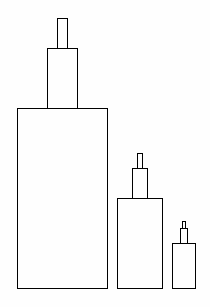
Make your own bunchOfBlocks function. If you want, just make some changes to the code above and see what happens. Then change the main code in your file to call the bunchOfBlocks function several times with different x, y, and scale parameters. Then run your file.
- Now we can have some fun with our bunchOfBlocks
function. At the top of your file, put the following statement.
import randomReplace the main block of code with the following. Note the use of the function random.random() in both the x, y location and scale factor. The function returns a random number between 0 and 1.0. The for expression executes the code inside the block the number of times specified in the argument to the range function.
for i in range(10):
    bunchOfBlocks( random.random()*600 - 300,
                   random.random()*600 - 300,
                   random.random()*2 + 0.5 )
When you are done with the lab exercises, you may begin Project 2.
© 2017 Ying Li. Page last modified: .