CS 151 Fall 2025 Syllabus Labs/Projects
Project 7: Fractals and trees
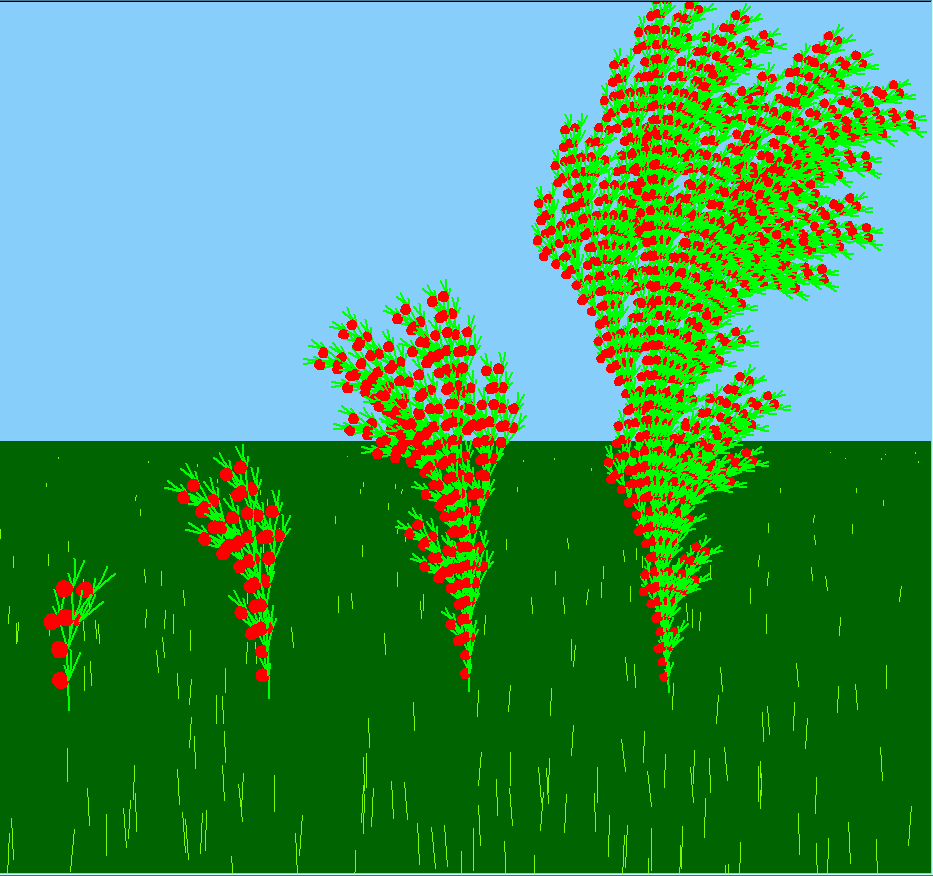
In this project, you practice writing programs that use classes that you wrote yourself. You will practice modifying your classes to add new capabilities.
Specifically, you will modify the TurtleInterpreter class to draw trees with ornamentation (e.g. colorful berries, and leaves) and create scenes that include L-systems.
Tasks
1. Drawing trees
You will modify the TurtleInterpreter class (drawString method) to add support for drawing branches, leaves, and berries. Any one of these new ornamentations may have a different color than the tree itself.
1a. Branching
Modify your drawString method to expand the L-system alphabet to include these new symbols:
[is save the current turtle state (position and heading)]is restore the previous turtle state (position and heading)
Your implementation should involve a list that you add (remove) the turtle's current position and heading state to (from), respectively.
Remember: position and heading should be restored in reverse order compared to how they were added.
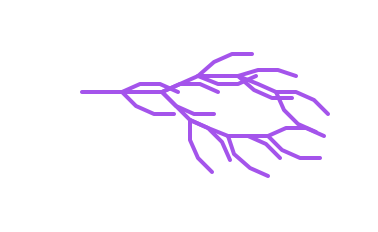
Test out your code with test_drawString.py from lab with systemB.txt, a distance of 10 pixels, and angle of 22.5 degrees. You should get this sideways tree:
Remember: The turtle position method returns a tuple of the x and y coordinates of the turtle. You access items in a tuple just like a list: yourTuple[0] for the x value and yourTuple[1] for the y value
1b. Leaves, color, and berries
Modify your drawString method to expand the L-system alphabet to include these new symbols:
<is save the current turtle color state.>is restore the current turtle color state.gis to set the turtle's color to green (e.g. (0.15, 0.5, 0.2)).yis to set the turtle's color to yellow (e.g. (0.8, 0.8, 0.3)).ris to set the turtle's color to red (e.g. (0.7, 0.2, 0.3)).Lis draw a leaf at the current turtle positionBis draw a berry at the current turtle position
To make your berry and leaf implementation work well for different distance values, make the circle radius some factor of distance (e.g. distance/2, distance/4, etc.)
Notes
Color save < and restore >
Saving and restoring the color state should follow the same strategy as branching: you should define an initially empty color list, then add (restore) color information to it when the < (>) character is encountered.
Recall that the turtle color method returns a tuple (fill and edge colors). We only really care about the fill color, the first item, so if you color list is called colorStack use the syntax:colorStack.append(self.turt.color()[0])
Leaf L
You can get fancy, but minimally you can model a leaf as a semi-circle (hint: check out the turtle circle method documentation). Whether you fill leaves is up to you.
Assume that a leaf is drawn in whatever the current color is. This can be controlled in the L-system string in combination with your y, r, g, <, and > symbols (see systemCL.txt below for an example).
Berry B
You can get fancy, but minimally you can model a berry as a full circle. Whether you fill berries is up to you.
Assume that a berry is drawn in whatever the current color is. This can be controlled in the L-system string in combination with your y, r, g, <, and > symbols (see systemPineMod1.txt below for an example).
1c. Test your new L-system symbols
Download the following L-systems and test out your code with test_drawString.py from lab:
| L-system | distance (pixels) | angle (deg) | Output |
|---|---|---|---|
| systemC.txt | 60 | 42 | Sideways purple tree with 2 branches and some leaves |
| systemCL.txt | 30 | 22.5 | Sideways purple tree with many branches and green leaves |
| systemPineMod1.txt | 30 | 22.5 | Sideways purple tree with red berries, but no leaves |
Take screenshots of each output. These are required image 1, 2, and 3 in your project report.
2. Growth and form
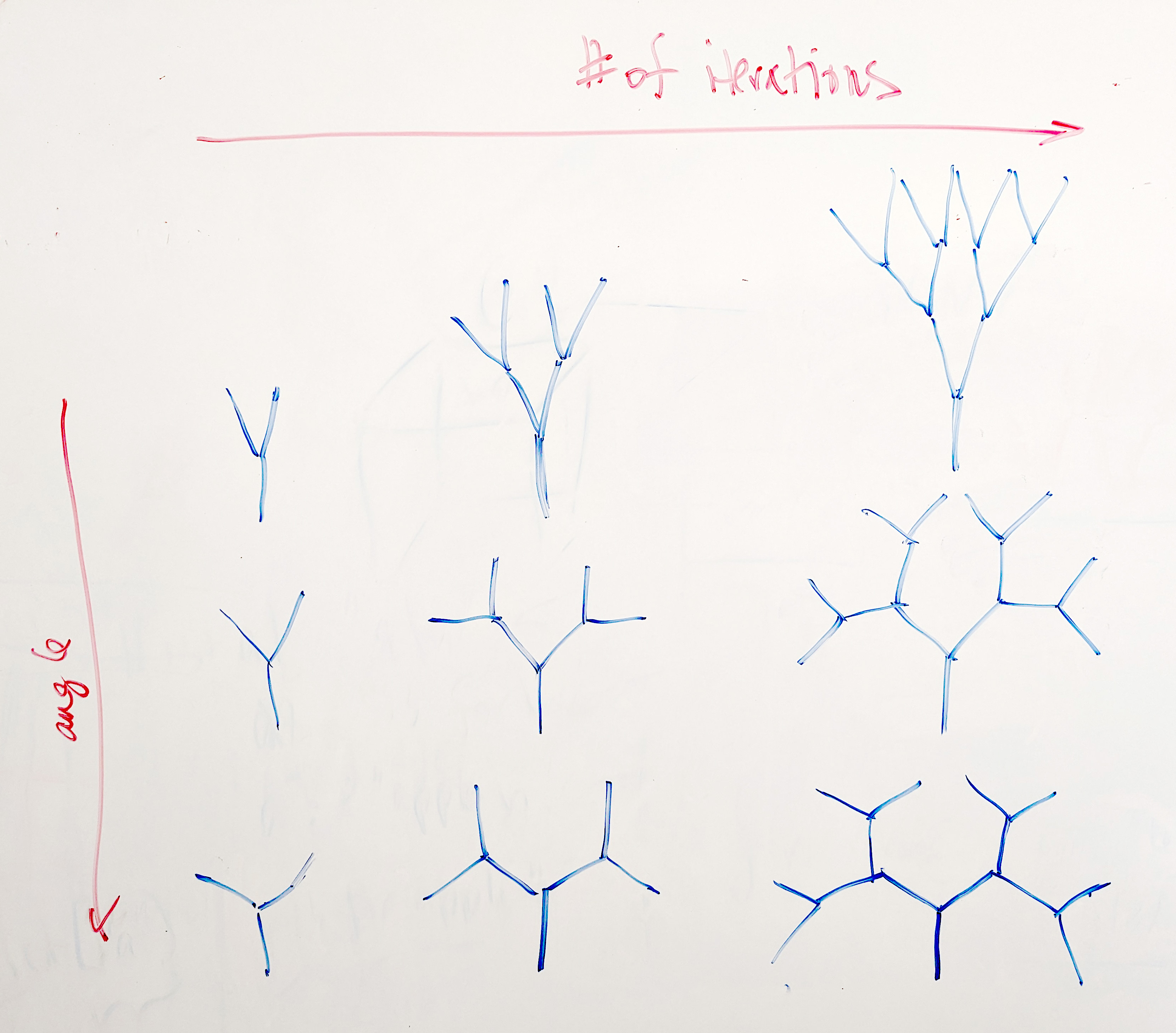
Write a program in a new file grid.py that draws a set of 9 trees based on the systemPineMod1 L-system. Order the 9 trees as a 3x3 grid. From left to right the number of iterations of the L-system should go from 1 to 3. From top to bottom, the angle of the L-system should be 22, 46, and 60. Draw your trees right-side up 😃 and use a nested loop to create the grid (don't hard code it!).
Important: Your program should ONLY import lsystem and turtle_interpreter, NOT turtle!
Take a screenshot of the output. This is required image 4 in your project report. If you use command-line arguments, document usage in the caption.
3. Design your own L-system
Inspired by a print from "Art Forms in Nature" by Ernst Haeckel, make a new L-system of your own with brackets (e.g. a tree). They can be variations on one of the ones provided, a variation on an L-system from The Algorithmic Beauty of Plants (look at pages 9, 10, and 25 for single-rule L-systems), or one you create on your own. The overall concept of the Algorithmic Beauty of Plants is that we can represent real plants and how they grow using strings and rules for manipulating them.
In your report section called Art Reflection discuss which Ernst Haeckel work and/or Algorithmic Beauty of Plants system inspired you and what aspects of the compositions you emulated. If you modified an L-system discuss how it was modified.
Use test_drawString.py to display your own L-System and take a screenshot. This is required image 5 in your project report. Include the command line arguments to reproduce this image in the image caption.
4. A scene with trees
Make a new file scene.py that makes a scene with two or more types of trees L-systems. Include in your scene the L-system you designed. The scene does not need to be complex, but your code should exhibit modularity and good design.
Important: All drawing in scene.py should be done using L-system strings / TurtleInterpreter. You should NOT import turtle or use turtle directly.
You should have elements in your scene other than trees. You can draw simple, non-fractal shapes by hard coding L-system strings that you pass into the drawstring method of TurtleInterpreter. For example, terp.drawString('F-F-F-F', 30, 90) would draw a square.
Take a screenshot of the output. This is required image 6 in your project report. If you use command-line arguments, document usage in the caption.
Check reproducibility
In order to grade your project, we need to be able to run your code and get the same results as you do! In your project submission ZIP file, please include any L-system .txt files that are needed run your code.
Here is a summary of the expected outputs from each of the source code files that you created:
python3 grid.py: Makes a 3x3 grid of trees based on thesystemPineMod1L-system. If you use command-line arguments, document usage. [Required Image 4]python3 test_drawString.py <YOUR L-system filename> <distance> <angle>: Should draw your own L-system. Document command line arguments in the report. [Required Image 5]python3 scene.py: Should draw your L-system scene. If you use command-line arguments, document usage. [Required Image 6]
If you use command-line arguments, please explain what they are and provide an example way to run your code in the image captions of your report.
Extensions
Congratulations on completing the core tasks! Between the code that you’ve already written and the report that you write, you’ve already earned up to 26/30 points for this project. If you turn it in by the first deadline that's 27/30 points.
The remaining 3/30 are a chance for you to earn credit for exploring parts of this project and digging deeper to express your creativity! This is entirely optional; 27/30 is an A- and is a perfectly respectable place to stop. Extensions are open-ended and exist to compliment the structured core project. Explore and learn something new that interests you! Concentrating your energy on 2 "deep" extensions that challenge you will earn you more points than many small, "shallow" extensions.
You can pick your own topics that interest you. Here are a few examples:
- Create an L-system of your own that draws something interesting. Start by editing a provided L-system or from the Algorithmic Beauty of Plants book (link above). (.5pt each)
- Add extra ornamentation to your trees by introduces new symbols in your L-system alphabet. Make them do something interesting. (.5pt each)
- Import one of your scenes from Project 2 or 3 and add trees or fractal shapes to them. It's all turtle graphics, after all. (.5pts)
- Make an abstract scene with non-tree fractal L-systems. Use lots of color! (.5-1pts)
- Make your abstract image function take in (x, y, scale) as parameters and demonstrate you can properly translate and scale the abstract image by including multiple copies, at different locations and scales, in one scene. (.5pts)
- Make Task 2 more interesting by adding additional elements to the image that also change across the grid. For example, make the trees move from summer to fall to winter along the horizontal or vertical axis. (.5-1pts)
- Give the function for Task 2 the parameters (x, y, scale) and demonstrate you can properly translate and scale the grid. (1pt)
Submission checklist
To turn in your project, make sure you do all of the following:
- Check the rubric in Google Classroom and make sure your report and code contain all the required parts.
- Rename your project folder to include your Colby username. For example, I would name mine
hewolfe_Project7.zip. - Create a zip file of your project.
- Attach (drag) the zip file to the posted project assignment on Google Classroom.
- Click "Turn In" on the Project 7 assignment in Google Classroom.